
HOW IT WORKS
How to Play
Quizzoholics Trivia
Quizzoholics is a live, hosted trivia game where teams play using their phones.
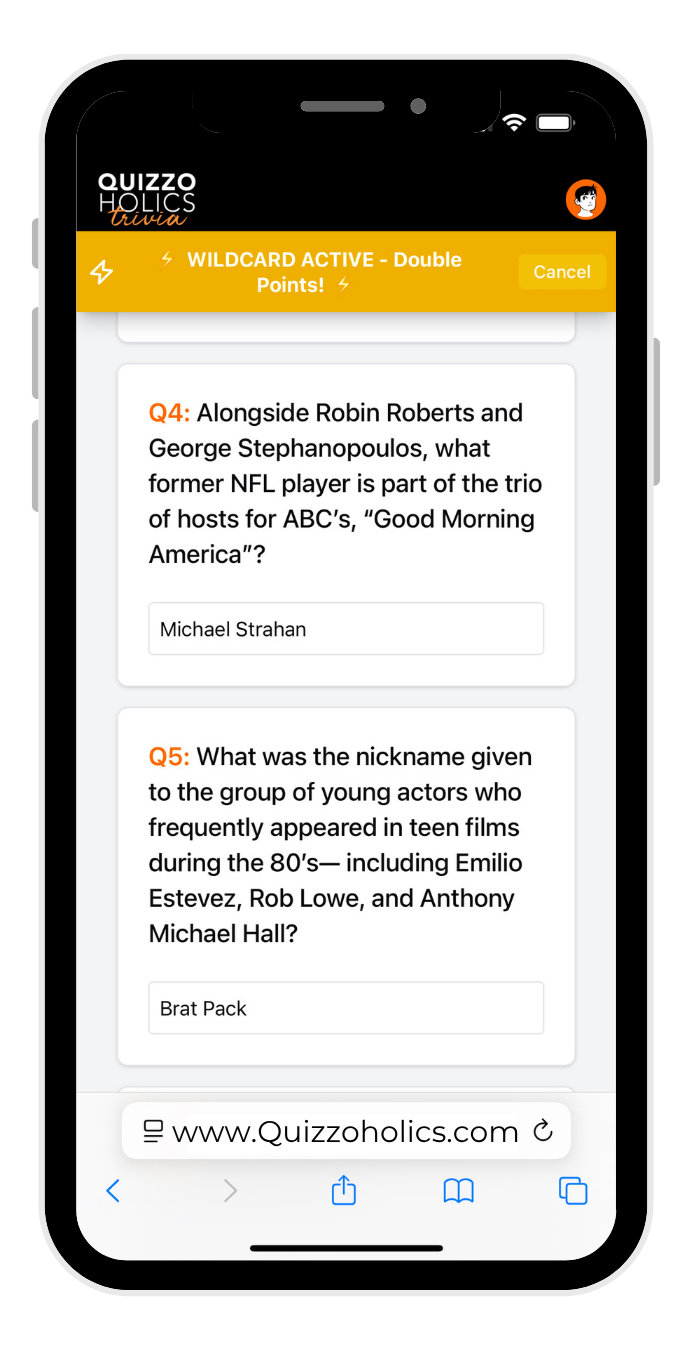
Questions, images, and audio all appear right on your device—no paper, no shouting over clipboards, just pure trivia chaos (the fun kind).
All you need:
A phone or tablet (at least one per team)
A team name
Friends are optional but highly recommended.
STEP 1
CREATE YOUR ACCOUNT
Register once. Use it at any Quizzoholics event.
STEP 2
CREATE OR JOIN A TEAM
Captains create teams. Friends join with a Team Key.

STEP 3
ENTER THE GAME PIN & PLAY
Your host gives you tonights game pin. Answer right on your phone.

1. Create Your Player Account
You only need to do this once.
Click the “Play Trivia” button on our website (your host venue may also provide a QR code).
Choose Register and create your player account using:
Email and password
Once registered, you’ll log in with the same account at any future Quizzoholics event.
Note: Email verification isn’t required to play, but you will need access to that email if you ever have to reset your password.
2. Create or Join a Team
Quizzoholics is team-based—standings, scores, and prizes are all tracked by team name.
Even if you’re playing solo, you’ll still create a team.
After you log in, you’ll be prompted to:
Create a Team
Join a Team, or
Skip for now (you can always set this up later in your profile).
2A. Creating a Team (Team Captain)
If you’re the one organizing your crew, you’ll:
Click Create Team.
Choose a team name (this is what shows on leaderboards and standings).
You are now the Team Captain for that team.
In your profile, you’ll see:
Your Team Info
A unique Team Key (6-letter code)
A QR code for teammates to join your team
Team name tip: Team names are reserved like usernames. Once you change your team name in your profile, someone else can grab the old one. If you found an amazing pun on Google, maybe don’t give it up.
2B. Joining a Team (Teammates)
Teammates must also log in with their own individual accounts (no guest mode).
You can join a team in a couple of ways:
Scan the Team QR Code
Have your captain open their Team QR in their profile.
Scan it with your phone.
Enter the 6-letter Team Key when prompted.
You’re now part of that team.
Search by Email
Go to the Manage Team section in your profile.
Search for an existing user by their email address.
Invite them to join your team.
Once you’re on a team, you’ll stay on that team in the system unless you leave or are removed. Teammates can also be removed from the roster by their team.
Solo players: Playing alone? Just create a “team of one.” Your team name will still appear on the leaderboard like everyone else.
3. Joining a Game at the Venue
When you arrive at a Quizzoholics event:
Connect to the game:
Scan the venue’s QR code or
Click the Play button on our website
Log in to your Quizzoholics account (if you aren’t already).
Enter the Game Pin announced by the host.
The Game Pin is a 4-digit number unique to that night’s game.
You’ll then see:
A drop-down list of teams you’re part of (as captain or teammate)
The option to create a team if you’re not already a captain
Choose which team you’re playing as for this game and you’re in.
Game Pin vs. Team Key – Don’t mix these up:
Game Pin = 4-digit code for tonight’s game
Team Key = 6-letter code used to join a specific team
What if the team captain isn’t there?
Team captains control the original team. If your usual captain isn’t at trivia:
They can share their login with a teammate (if they choose to—at their own risk), or
A teammate can create a new team and invite everyone to that alternate team
Your old team name is not “locked” if the captain changes or abandons it, so someone else may eventually claim it
4. How the Game Works
Each game features 10 rounds of trivia with a mix of:
Themed Q&A rounds
Visual image rounds
Audio “Name That Tune”–style rounds
Speed rounds
A multi-answer challenge
A big final random knowledge round
Your host runs the show, keeps the pace, and announces breaks and standings.
What You See on Your Device
Once you’re in the game:
All teammates see each question on their own device.
For visual rounds, images appear clearly on your screen.
For audio rounds:
Each clip is played over the venue speakers twice.
Then, every teammate can replay the audio individually on their own device—as many times as the round timer allows.
Answering Questions
Only the Team Captain can type and submit answers.
As the captain types:
All teammates can see the answers fill in on their own devices in real time.
This makes it easy to collaborate and know if your captain is really listening to your input .
You can change your answers anytime during the round until:
The captain taps Submit, or
The round timer runs out
Once either happens:
Your answers are locked in for that round.
If you don’t manually submit before the timer expires, whatever you had entered is automatically submitted to the host.
If the captain’s device freezes or disconnects, they’ll need to log in on another device and rejoin the game to keep submitting answers.
5. Power-Ups
To keep things spicy, every team gets two special boosts.
Wildcard
Available in Rounds 1–8
Doubles your score for that round
No penalty for wrong answers
→ If you bomb the round, you simply get your doubled (possibly low) score.
Double Down
Only available in Round 10 (Final Round)
Doubles your final round score if every answer that round is correct
But if any answer is wrong, you get zero for the round
Skipped questions or blank answers DO NOT negatively impact your score
Teams can see:
When their power-ups are available and activated
When other teams have used theirs as well
Use them wisely—well-timed power-ups can make or break your night.
6. Scoring & Leaderboard
Throughout the night:
You earn points for each correct answer.
Your cumulative score is updated during scoring breaks:
Every 2 rounds through round 8 then
After Round 9
And once more at the end of Round 10
You can see the leaderboard at the bottom of your screen during the game, so you always know where you stand.
Prizes and formats vary by venue, some locations award prizes every 2 rounds, some offer an overall winner at the end of the night and some offer both, check your venues page from our schedule to see what the prize structure is where you play.
7. Teams, Devices, and Late Arrivals
Team Size: Live play is limited to up to 8 players per team (even though the app doesn’t hard-cap it).
Devices: Only one device is required per team for submitting answers, but:
It’s highly recommended that all teammates have the game open so they can see questions, images, and audio clearly—especially in loud venues.
Late arrivals: Teams can join the game late using the Game Pin. You’ll start earning points from whichever round you join.
You can use WiFi or cellular service—if your phone can browse the web, you can play. Slower devices may be a bit laggy, but the game will still work.
8. House Rules & Etiquette
We love competition. We do not love cheating.
No Outside Help
Yes, you’re on your phone.
Yes, you could Google or ask ChatGPT for answers.
Please don’t.
No searching for answers during rounds
No lifelines; phoning a friend who isn’t present is not allowed.
No using other trivia apps or detailed notebooks for “inspiration”
The prizes are fun, not life-changing—but playing fair keeps the game fun for everyone.
Be Cool to Staff
Trivia night usually means:
A full room showing up at once
Servers getting slammed with orders
So please:
Be patient if food and drinks take a little longer
Treat your servers with respect
At Quizzoholics events, a 20% tip is considered the baseline—feel free to go above and beyond if your server is crushing it.